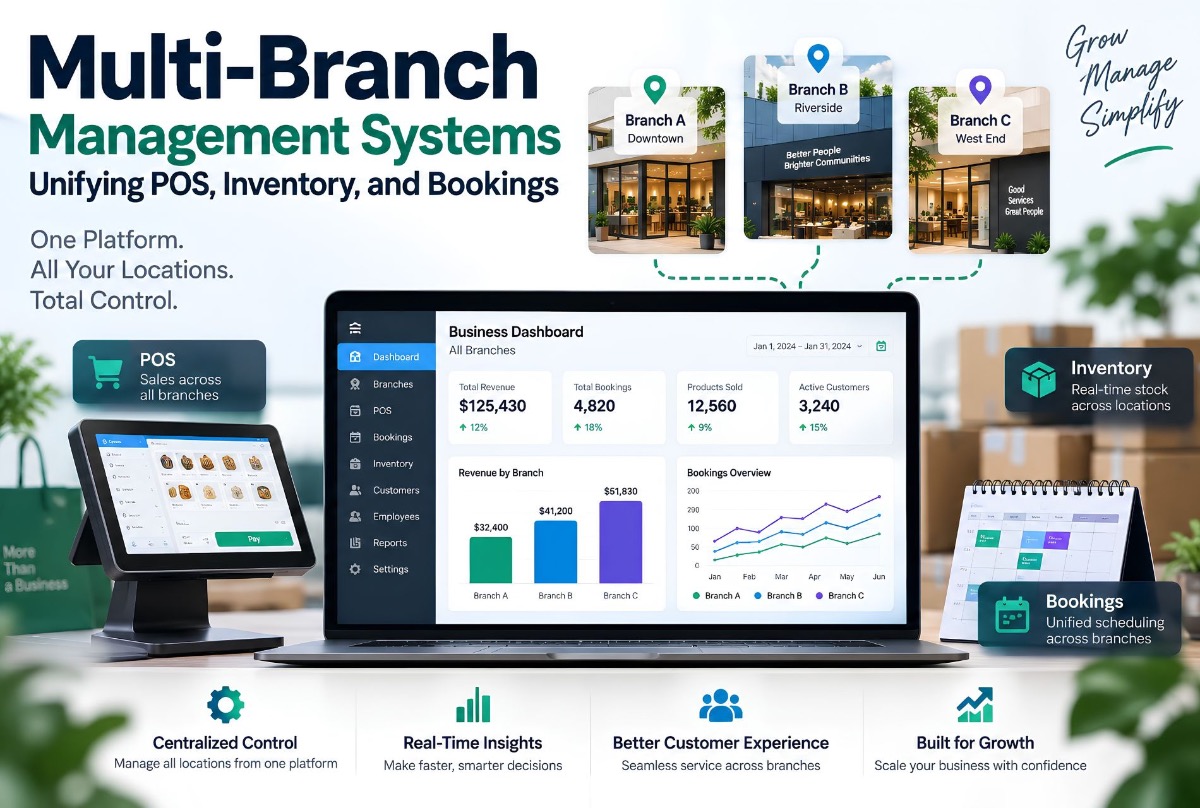
Running one business from one location is relatively straightforward.
Running the same business across five, ten, or twenty locations is a different operational problem.
Each branch may have its own staff, customers, bookings, sales, inventory, and daily activity. Management still needs a consolidated view of the entire business.
This is where software for multi branch business management becomes important.
The challenge is not simply putting every branch on the same software. The real challenge is creating a system where branches can operate independently while management can still see the business as one organization.
A well-designed multi-branch management system can connect areas such as POS, inventory, bookings, customer management, staff, finance, reporting, and branch operations.
The goal is straightforward: each branch operates locally. Management sees the complete picture.
What Is Multi-Branch Business Management Software?
Multi-branch business management software is a centralized system designed to help businesses operate and monitor multiple locations from one platform.
Instead of treating every branch as a separate operation, the system understands the relationship between:
Company → Branches → Employees → Customers → Transactions → Inventory → Bookings → Reports
A branch manager may only need access to their own location. A regional manager may need access to several branches. An owner or administrator may need a consolidated view of the entire organization.
The software needs to support all three without creating separate disconnected databases and processes.
Why Managing Multiple Branches Gets Complicated
Opening another branch does not simply multiply your revenue opportunity. It also multiplies operational coordination.
Consider a business with three locations. Each branch may have different employees, schedules, inventory, customers, sales, and bookings. Management may still need to answer:
- Which branch is performing best?
- What inventory is available at each location?
- Which staff members are scheduled today?
- How many bookings are coming up?
- Which customers have not returned?
- What revenue has each branch generated?
- What inventory needs to be moved or reordered?
If every branch uses separate systems, answering these questions can require manual consolidation. That is where a centralized system becomes useful.
The Problem With Running Every Branch Separately
A common approach is to give each branch its own tools — for example Branch A, B, and C each with their own POS, booking, and inventory stack. At first, this may appear organized.
The problem comes when management wants a company-wide view. Now the business needs to combine Branch A data + Branch B data + Branch C data. The more locations you add, the more difficult that process can become.
A centralized architecture changes the model: one central platform, with Branch A, B, C, and D operating within their own scope while management accesses consolidated information.
What Should a Multi-Branch Management System Include?
There is no universal feature list. The right modules depend on the business. However, several capabilities commonly become important as businesses expand across locations.
1. Centralized Customer Management
A customer should not necessarily become a completely different customer record simply because they visit another branch. A centralized customer system can maintain a broader customer history — previous bookings, purchases, membership, preferences, communication history, and branch activity.
This can give staff more context when serving returning customers. It also allows management to understand customer activity across the organization.
2. Branch-Level Booking Management
Each branch may have different working hours, staff, services, resources, and availability. The booking system needs to understand those differences.
For example: customer selects service → selects location → system checks branch availability → system checks staff/resource availability → available times displayed → booking confirmed.
The important part is that availability should come from the operational data. A customer should not be offered a time simply because another branch has capacity. See how Largify approaches connected booking and operations in the Beauty & Wellness industry hub and case studies like Man of Cave.
3. Centralized POS Management
Point-of-sale activity creates some of the most important operational data in a branch-based business. A centralized system can associate each transaction with branch, employee, customer, products, services, payment method, discounts, taxes, and transaction status.
That allows a branch view (today’s sales, transactions, payment activity, staff activity) and a management view (total company sales, sales by branch, by service, by employee, payment breakdown) from the same underlying transaction data.
4. Multi-Location Inventory Management
Inventory becomes particularly complicated when stock exists in several locations — for example central warehouse → Branch A → Branch B → Branch C.
Management may need to know what is in stock, which branch is running low, what has been transferred, consumed, purchased, or needs reordering. A multi-location inventory system should distinguish inventory by location rather than treating the entire business as one warehouse.
| Product | Branch A | Branch B | Branch C |
|---|---|---|---|
| Product A | 20 | 5 | 12 |
| Product B | 4 | 18 | 7 |
| Product C | 30 | 10 | 2 |
This simple structure can answer questions that become difficult when inventory is maintained in separate spreadsheets.
5. Stock Transfers Between Branches
Sometimes one branch has excess stock while another needs it. A centralized system can support a defined transfer workflow: Branch B requests stock → manager approves → stock leaves Branch A → transfer recorded → Branch B receives stock → inventory updated. Every movement becomes part of the inventory history — more reliable than manually changing quantities in separate files.
6. Staff Management Across Locations
Employees are another important part of multi-branch operations: profiles, roles, schedules, branch assignments, availability, services, commissions, and performance information. Some employees work at only one branch; others work across several. The system needs to understand both the employee and their branch assignments.
7. Centralized Reporting
This is often the biggest reason management wants a unified system. Useful reporting might include revenue by branch, service, employee, and period; operations metrics like bookings, cancellations, completed services, and staff utilization; inventory stock and movement; and customer activity by branch.
The exact reports should be based on the decisions management actually needs to make. A dashboard full of numbers is not automatically useful.
Multi-Branch Management Is More Than a Dashboard
A common mistake is to think that a multi-branch system simply needs a management dashboard. The dashboard is only the visible layer.
The underlying system needs to understand who owns the data, which branch it belongs to, who can access or change it, what happens when a transaction occurs, how that transaction affects inventory, and how it appears in reporting. These relationships need to be designed into the application.
Role-Based Access Is Essential
Consider a company with an owner (entire organization), regional manager (several branches), branch manager (one branch), and employee (assigned operational functions). These users should not all receive the same data.
A multi-branch management system should define permissions around the organization’s structure — for example Company → Region → Branch → Department → Employee. The exact hierarchy depends on the business.
How POS, Inventory, and Bookings Should Work Together
The real value comes when these modules are connected. Consider a salon appointment:
Customer books service → booking created → staff assigned → service completed → products used recorded → checkout processed → inventory updated → transaction recorded → branch revenue updates → management reporting updates.
That is one business event producing information across several operational areas. If those functions exist in separate systems, someone may need to transfer the information manually. A unified platform can connect the workflow — which is exactly what custom ERP development and connected operating systems are designed to support.
A Practical Example From Largify’s Work
Largify’s documented Beauty & Salon work includes operational areas such as booking, calendars, CRM, memberships, loyalty, POS, inventory, finance, and multi-branch workflows.
That combination matters because these functions are not independent. A booking can involve a staff member. A service can affect inventory. A completed transaction affects revenue. Customer activity can affect future bookings and memberships.
The value of an integrated system comes from connecting those relationships rather than simply placing many features inside one dashboard. Related proof: Jam Beauty Lounge and Man of Cave.
When Should a Business Consider Multi-Branch Software?
A business does not need a particular number of locations before considering a centralized management system. The operational complexity is what matters.
Evaluate a multi-branch system when:
- Each location maintains separate operational data
- Management spends time consolidating branch reports
- Customers move between branches
- Inventory is held at multiple locations
- Employees work across locations
- Bookings need branch-specific availability
- Management needs centralized reporting
- Branches follow the same core business process
- Different systems need to exchange information
The number of branches is only one variable. A business with two complex locations can have more software problems than a simple business with ten.
What About Existing SaaS Tools?
You do not automatically need to replace every system. You may already have a booking platform, POS, accounting system, CRM, or inventory application that works well.
The first question should be: Can the existing systems provide the required multi-branch visibility and integration?
If they can, integration may be enough. If they cannot, you may need a more centralized architecture.
This connects directly to the earlier discussion of the real cost of fragmented SaaS systems. The goal is not to replace software for the sake of consolidation. The goal is to remove operational friction.
Multi-Branch ERP vs Separate Branch Software
Separate branch systems
Each branch has its own customers, bookings, POS, inventory, and reports. Management consolidates the information later.
Centralized ERP
The organization operates through one connected system: Company → Branches → shared business data → connected modules → centralized reporting.
This can create a much clearer operating structure when separate branch systems are becoming difficult to manage. Learn more about Largify’s custom ERP development services.
When a Custom ERP Makes Sense
An off-the-shelf platform may already solve the problem. Custom ERP becomes more relevant when the business has requirements such as unique branch workflows, complex permissions, multiple brands, custom approval processes, specialized inventory rules, existing systems that must be integrated, custom reporting, business-specific customer journeys, or multiple operational departments.
For example, a company operating several brands may need one management layer while keeping each brand’s services, staff, inventory, and reporting distinct. That is a different requirement from simply purchasing a generic POS.
Multi-Branch Software for Salons, Clinics, and Service Businesses
Multi-branch management is particularly relevant to businesses where customers, staff, bookings, inventory, and transactions interact.
- Salons and beauty businesses — bookings, staff, services, memberships, POS, inventory, customer history, branch reporting (Beauty & Wellness)
- Clinics — patients, appointments, staff, services, billing, inventory, branch reporting (Healthcare & Clinics)
- Service companies — customers, jobs, employees, scheduling, inventory, payments, branch performance (SME & Enterprise Ops)
The modules change by industry. The underlying principle remains the same: centralize the information that needs to be shared while keeping branch operations properly separated.
How ValionOS Fits Into the Broader Model
Largify’s ValionOS takes the idea of connected business operations further by positioning business functions as connected modules within a broader operating system.
That model is useful when thinking about multi-branch operations because businesses often do not have a single problem — they have several connected ones: CRM, bookings, inventory, finance, automation, and reporting. The important question becomes how those functions interact.
ValionOS is designed around that broader connected-business concept rather than treating each operational requirement as an isolated application. Read the ValionOS case study or explore ValionOS.
What a Multi-Branch Management Architecture Can Look Like
A simplified structure: Central Business Platform → CRM, Bookings, POS, Inventory, Finance, Staff, Reporting → Branch A, B, C, D.
Each module works with shared business data while permissions determine what individual users can access. Adding another branch should not require creating an entirely separate technology environment.
What Should Be Centralized?
Not everything needs to be global.
Often company-wide: customer identity, product catalog, service catalog, organization settings, company reporting.
Often branch-specific: local inventory, branch staff, branch schedules, branch transactions, branch-specific operational permissions.
The system should distinguish between the two. This is one of the most important parts of designing multi-location business software.
What Should You Track Across Branches?
Start with management decisions. If the owner needs to compare branch performance, the system needs consistent data for revenue, customer activity, and inventory by branch. The reporting model should be designed before building the dashboard — otherwise the business can end up with attractive charts that do not answer meaningful questions.
How to Start a Multi-Branch Software Project
Do not begin by asking a development team to build “a multi-branch ERP.” That description is too broad. Start with the operating model:
- Map the branch structure — locations, brands, departments, user roles, central teams
- Map the core workflows — booking, sales, inventory, customer management, staff, finance, reporting
- Identify shared data — which records need to be available across branches
- Define branch-level permissions — who can view and change what
- Identify existing systems — SaaS platforms, spreadsheets, POS, accounting tools
- Decide what to integrate or replace — do not replace a system simply because it is old
- Build the core — start with the workflows that create the most operational value, then expand
If you are still mapping whether ERP or a SaaS stack fits better, read Custom ERP vs SaaS cost and when to replace spreadsheets with custom software.
Do Not Build a Giant ERP on Day One
A multi-branch system can quickly become too large. If you attempt to build CRM, POS, inventory, finance, HR, marketing, booking, loyalty, analytics, AI, and mobile apps all at once, the project becomes difficult to control.
A better approach is to establish the core operational foundation first — for example Customers + Bookings + POS + Inventory + Branch Reporting — then add other modules based on actual business requirements. The first objective should be a reliable operating system, not a feature catalogue. That progressive approach also aligns with how Largify scopes SaaS product development and custom software engagements.
What Does Multi-Branch ERP Development Cost?
There is no meaningful fixed price. The scope depends on number of branches and users, modules, existing systems, integrations, reporting, permissions, data migration, mobile requirements, automation, and custom workflows.
A business with three locations and four core modules is a very different project from a multi-brand organization with dozens of locations and complex financial and operational requirements. The correct way to estimate the project is to map the workflows first.
The Real Goal of Multi-Branch Management Software
The objective is not simply to give management a dashboard. It is to create a consistent operating model — making it easier to answer what is happening, where, who is responsible, what action is required, what changed, and how the business is performing overall.
When POS, inventory, bookings, customers, staff, and reporting are connected properly, those answers can come from the same operational system.
Final Takeaway
A multi-branch business does not become difficult to manage simply because it has more locations. It becomes difficult when every location starts behaving like a separate business from a technology perspective — separate customer records, inventory, bookings, reports, and processes.
A centralized multi-branch management system can instead provide a shared operational foundation while allowing each location to maintain the access and workflows it actually needs.
For some businesses, existing SaaS products and integrations will be enough. For others, a custom ERP becomes the more appropriate solution. The decision should come from the workflows, data, and operational problems.
If your business is growing across multiple locations and POS, inventory, bookings, staff, and reporting are becoming difficult to coordinate, Largify can help evaluate whether an integrated ERP architecture makes sense.
If you are still clarifying whether you need a public website or operational software first, start with website vs web application.
Explore Largify’s custom ERP development services. You can also explore ValionOS or the ValionOS product page to see how Largify approaches connected business operations. Ready to talk? Start a project conversation.
Frequently Asked Questions
What is multi-branch business management software?
It is software designed to help businesses manage multiple locations through a connected operational system. It can include functions such as customer management, bookings, POS, inventory, staff management, finance, and centralized reporting.
What are the benefits of centralized multi-branch management?
Centralization can reduce duplicated data, simplify reporting, improve visibility across locations, and provide a consistent way to manage shared business processes.
Can one system manage multiple branches?
Yes. A properly designed system can maintain branch-specific data and permissions while providing company-wide visibility where required.
Can inventory be managed across multiple branches?
Yes. A multi-location inventory system can track stock by branch, record transfers, monitor consumption, and provide consolidated inventory visibility.
Can POS and booking systems be connected?
Yes. When designed as part of the same operational system, bookings, transactions, customers, staff, and other business records can be connected. Existing POS or booking platforms can also potentially be integrated where appropriate.
Does every multi-branch business need an ERP?
No. Existing SaaS products may be sufficient for some businesses. ERP becomes more relevant when multiple operational functions need to work together and existing systems cannot provide the required workflow, data, permissions, or reporting.
When should a multi-branch business consider custom ERP development?
Consider it when branch operations have become difficult to coordinate through separate systems, reporting requires manual consolidation, workflows are highly specific, or existing software cannot support the organization’s structure effectively.
Can a multi-branch ERP support different user roles?
Yes. A properly designed system can provide different permissions for owners, administrators, regional managers, branch managers, employees, and other roles based on the organization’s requirements.